As an Amazon Associate I earn from qualifying purchases.
Best AI Voice Recorder for Students vs Professionals (2026)
Heads up: some links here are affiliate links. If you buy through them I may earn a commission, at no extra cost to you. It doesn't change what I recommend.
Which AI voice recorder fits a student versus a working professional, compared on transcription limits, call recording and form factor.
AI Life / Gadgets / AI Recorders
Short answer: students should buy for minutes, professionals should buy for calls and where the notes go. A full course load runs to dozens of lecture hours a month, which blows through a 300-minute free tier in days, so a recorder with no transcription meter wins. A professional’s day is calls plus meetings, so the recorder has to pick up a phone call and hand the action items to the tools you already use. Pocket does both, which is why it’s my pick for each. Plaud Note Pro is the pick if you mainly record large rooms and will pay for a plan.
How are students and professionals different?
They record different things in different places:
| Student | Professional | |
|---|---|---|
| Typical recording | 50 to 90 minute lectures | 15 to 60 minute calls and meetings |
| Where | A lecture hall, one main speaker | Laptop, phone and conference rooms |
| Hours a month | Often 40 or more | Varies a lot, often 20 to 60 |
| What matters most | Free minutes, room pickup, battery | Call recording, speaker labels, exporting notes |
| Where notes end up | A study tool or notes app | CRM, email, task list, an AI agent |
| The rules | Instructor and school policy | Employer policy and consent laws |
Those differences decide the pick more than any spec sheet.
How many minutes does a student actually need?
Do the math before you buy. A typical full-time load is 12 to 15 class hours a week. Over four weeks that’s roughly 48 to 60 hours, or about 2,900 to 3,600 minutes a month. Plaud’s free Starter tier is 300 minutes a month, which is about five lectures. Plaud sells bigger plans, so a Plaud student is paying for a subscription. Pocket’s free plan has no minute cap (Pocket price breakdown). For a student, that one difference outweighs most hardware specs.
Which recorder picks up a lecture hall best?
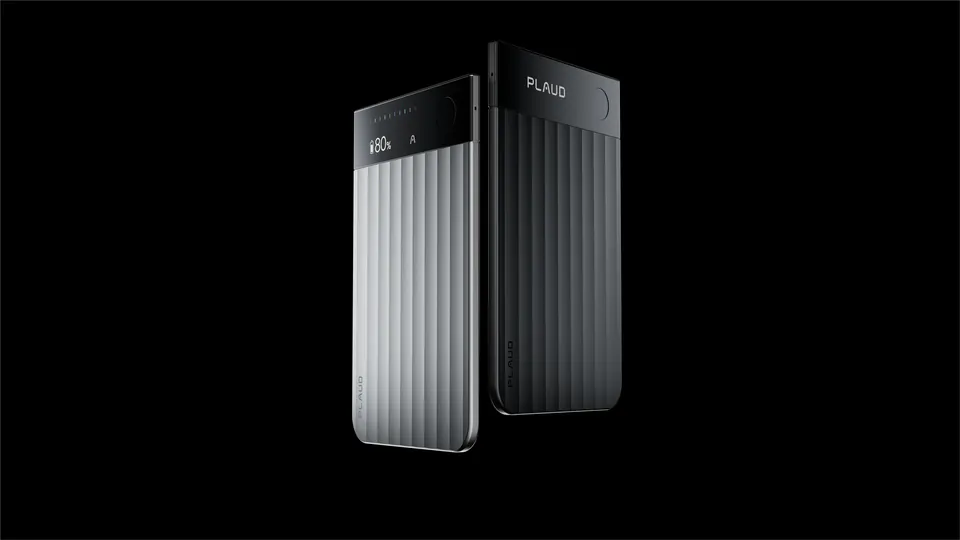
Room pickup favors more microphones. The Plaud Note Pro has four MEMS microphones and a vibration sensor, and Plaud designed it to pick up a room (Plaud). Pocket has two microphones plus a contact mic for calls. In a big hall, sit closer to the front or near a speaker if the room has amplification, whatever you use. A recorder in your bag on the back row will struggle no matter how many microphones it has.
Which is best for a student?
Pocket for most students, because of the unmetered free plan and the fact that it records a phone call home or a study group as easily as a lecture. Get Pocket
Plaud Note Pro if you mainly record big rooms and your school or budget covers a plan. See Plaud recorders
Your phone and a free app if you only record a lecture or two a week. Don’t buy hardware for a problem you don’t have.
A transcript is most useful once it’s in a study tool, so pair the recorder with one. See AI study tools for college.
Which is best for a professional?
Pocket if your day is calls plus meetings and you use AI tools. The contact mic picks up both sides of a phone call without speakerphone (how Pocket records calls), the desktop app covers laptop meetings with no bot, and the MCP server lets Claude search your conversations and work your action items.
Plaud Note Pro if you run a handful of big room meetings and want the extra microphones. It records calls too and switches to call mode automatically.
Plaud NotePin S if you’re on your feet all day, like a site visit or a clinic walk-through, and calls aren’t part of it. It’s a wearable with a physical button, but it doesn’t record phone calls (NotePin S review). See the NotePin S on Amazon
A desktop app if all your meetings are on a laptop. See best AI note taker with no bot.
Quick pick
| You are | Pick | Why |
|---|---|---|
| Student, full course load | No minute meter on the free plan | |
| Student, a few lectures a week | Phone app | Hardware may be overkill |
| Pro, many calls, uses AI agents | Calls, meetings and MCP in one | |
| Pro, big room meetings | Plaud Note Pro | Four microphones for room pickup |
| Pro, on your feet all day | Plaud NotePin S | Wearable, button-driven |
| Pro, laptop meetings only | Desktop note taker | No hardware needed |
How do I weigh the features?
Score each recorder from 1 to 3 on each line, multiply by the weight for your column, and add it up. The weights are my judgment about what matters for each life, not a measurement.
| Factor | Student weight | Professional weight |
|---|---|---|
| Free transcription minutes | 3 | 2 |
| Room pickup | 3 | 2 |
| Phone call recording | 1 | 3 |
| Export and agent access | 1 | 3 |
| Battery for a full day | 2 | 2 |
| Speaker labels | 1 | 3 |
What rules apply to recording?
Students: ask the instructor. Many schools require permission to record lectures, and some classes ban it. If you need recordings because of a disability, your school’s disability services office can arrange it as an accommodation, which takes the question off your shoulders.
Professionals: check your employer’s policy and the consent law where you and the other people are. Some US states, including California, require everyone to consent. I tell people when I’m recording.
Test it inside the return window
- Record a full week of your real schedule.
- Total the minutes and compare them to the free tier.
- Search for one detail from day one. Can you find it in under a minute?
- Export a transcript into the place it needs to live: your notes app, CRM or study tool.
- If any step fails, return it while you still can.
For the head-to-head, see Pocket vs Plaud after a month of meetings, and for the whole category, the AI recorder hub.
How accurate are AI voice recorders?
Good enough to search and summarize, not good enough to quote without checking. Accuracy depends far more on the room than on the brand. Two people at a table in a quiet office come out cleanly on any decent recorder. Eight people around a conference table with an air handler running come out with missed words and swapped speakers on every recorder. Accents, crosstalk, distance from the microphone and jargon all push error rates up.
Be skeptical of accuracy percentages on the box. Each maker measures on its own audio, so two vendors’ numbers aren’t comparable. The useful test is your own audio: record a real lecture or meeting, then read a two-minute stretch of the transcript against the recording. If names, numbers and technical terms come through, it’s good enough for you.
For students, the stakes are a little different. A transcript with errors is still a great way to find the part of a lecture you need to rewatch or relisten to. Use it as an index into the audio, not as the notes themselves. For professionals, the stakes are the action items: a wrong owner or a wrong date on a follow-up is the error that costs you, so skim those first.
What should you pair with the recorder?
A recorder only captures. The value comes from where the transcript goes next:
- Students: a notes app or study tool that can turn a transcript into flashcards and summaries by topic.
- Professionals: your calendar and task list for action items, your CRM for customer calls, and an AI agent if you use one. Pocket’s MCP server is how mine flows into Claude.
- Everyone: a regular export, so years of recordings don’t live only inside one company’s app.
FAQ
What is the best AI voice recorder for college students?
One whose free plan covers a full course load. Lectures add up to dozens of hours a month, far past a 300-minute free tier. Pocket’s free plan has no minute cap. A room-focused recorder like Plaud Note Pro picks up a hall well but needs a paid plan for heavy use.
What is the best AI voice recorder for professionals?
One that records phone calls as well as meetings and sends notes where you work. Pocket and Plaud Note Pro both record calls without speakerphone. Pocket’s MCP server lets an AI agent read your transcripts and action items.
Can I record lectures with an AI recorder?
Often, but ask first. Many schools require the instructor’s permission, and disability services offices can arrange lecture recording as an accommodation. Some classes ban recording outright.
Is a wearable recorder better than a phone clip?
Only if most of your conversations are face to face while you move around. Wearables like the Plaud NotePin S do not record phone calls, and a phone clip covers calls and table meetings with one device.
Frequently asked questions
What is the best AI voice recorder for college students?
One whose free plan covers a full course load. Lectures add up to dozens of hours a month, far past a 300-minute free tier. Pocket’s free plan has no minute cap. A room-focused recorder like Plaud Note Pro picks up a hall well but needs a paid plan for heavy use.
What is the best AI voice recorder for professionals?
One that records phone calls as well as meetings and sends notes where you work. Pocket and Plaud Note Pro both record calls without speakerphone. Pocket’s MCP server lets an AI agent read your transcripts and action items.
Can I record lectures with an AI recorder?
Often, but ask first. Many schools require the instructor’s permission, and disability services offices can arrange lecture recording as an accommodation. Some classes ban recording outright.
Is a wearable recorder better than a phone clip?
Only if most of your conversations are face to face while you move around. Wearables like the Plaud NotePin S do not record phone calls, and a phone clip covers calls and table meetings with one device.